Polished Walnut Wood Texture Pack for Stunning Design Projects
If you're looking to infuse a touch of natural sophistication into your creative work, the Polished Walnut Wood Texture Pack is an excellent resource. This collection brings the organic beauty of walnut wood into digital format, offering artists, designers, and crafters a versatile tool to enhance their projects with authentic textures and timeless appeal.
What Makes Polished Walnut Wood Unique?
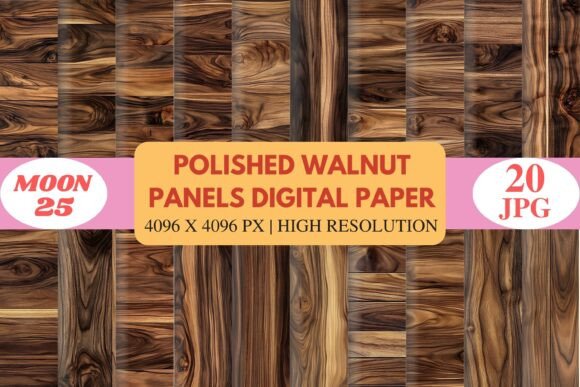
Walnut wood has long been admired for its rich, deep tones and intricate grain patterns. The Polished Walnut Wood Texture Pack captures these qualities in stunning detail, preserving the essence of real walnut surfaces through high-resolution scans. Each texture reveals the interplay of dark chocolate hues and warm golden streaks, creating a visual depth that's both inviting and elegant.
The swirling grain patterns are especially noteworthy, as they mimic the natural flow found in aged or handcrafted wooden pieces. Whether you’re aiming for a rustic vibe or something more contemporary, these textures can be seamlessly adapted to suit your vision.
High-Resolution Detail You Can Trust
One of the standout features of this texture pack is its resolution quality. All 20 textures are provided in JPG format at 4096 × 4096 pixels, ensuring crisp, clear visuals that hold up even when zoomed in or printed at large sizes. This level of detail is essential for professionals who require precision in their design work, such as those involved in packaging, branding, or stationery creation.
Because of the high resolution, users can confidently scale these textures without worrying about pixelation or loss of clarity. It also means that they perform well in print, making them suitable for physical products like invitations, signage, or home décor items.
Who Can Benefit from Using These Textures?
This texture pack isn't limited to a single type of user. Its broad application makes it valuable across multiple industries and hobbies:
- Graphic Designers: Use the textures to create backgrounds, overlays, or add subtle realism to mockups and product designs.
- Crafters & Scrapbook Artists: Bring a natural aesthetic to handmade pages, cards, and albums with lifelike wood finishes.
- Business Owners: Enhance your brand’s visual identity by incorporating polished walnut elements into logos, brochures, or promotional materials.
- Interior Designers: Simulate wooden surfaces in digital renderings or virtual room designs to give clients a realistic preview of furniture options.
- Planner & Stationery Creators: Add warmth and elegance to custom planners, journals, or greeting cards using these refined textures.
Even hobbyists working on DIY farmhouse décor or personal crafts will find the Polished Walnut Wood Texture Pack to be an invaluable addition to their toolkit. The versatility of these textures ensures that they can be used across both digital and physical platforms with ease.
Where Can You Apply These Textures?
The applications of this texture pack are vast. Here are some common use cases where it truly shines:
- Scrapbooking & Journaling: Replace traditional paper with walnut textures to give your layouts a unique, earthy feel.
- Invitation Backgrounds: Create bespoke wedding or event invites that stand out with a luxurious wood finish.
- Product Branding: Develop cohesive packaging or labels that reflect the premium quality of your goods.
- Farmhouse Décor Projects: Design wall art, calendars, or printable signs that align with rustic themes.
- Sublimation Work: Use the textures for heat transfer printing onto mugs, phone cases, or apparel for a personalized look.
- Stationery & Planner Design: Elevate your digital templates with a professional-grade wood texture overlay.
These textures are not just decorative—they serve as functional design elements that help communicate a sense of craftsmanship and authenticity.
Strengths of the Polished Walnut Wood Texture Pack
The Polished Walnut Wood Texture Pack stands out for several reasons. First, the variety of included textures allows for a wide range of creative possibilities. With 20 different sheets, each capturing the essence of walnut wood but with slight variations in tone and grain, there's always something new to explore.
Second, the instant download feature makes it easy to access and start using the textures right away. There’s no waiting for shipments or dealing with file formats—just high-quality JPGs ready for integration into any project.
Third, the textures maintain a consistent style while still feeling natural and varied. This balance ensures that your designs won’t appear repetitive, even if you're using multiple textures from the same pack.
Real-World Examples of Use
Let’s take a look at how others have applied these textures in practical settings:
- A local bakery used the textures to design eco-friendly packaging for their artisan breads, giving the brand a warm, natural edge.
- A freelance graphic designer incorporated the textures into a client’s website background to evoke a sense of luxury and timelessness.
- An online planner creator layered the walnut textures over minimalist designs to add depth and character to their monthly spreads.
- Wedding planners have used these textures as part of themed invitation suites, blending modern typography with classic wood aesthetics.
These examples show how adaptable and impactful the Polished Walnut Wood Texture Pack can be across various mediums and purposes.
Considerations When Choosing the Right Texture Pack
While the Polished Walnut Wood Texture Pack offers many benefits, it's important to consider whether it fits your specific needs. For instance:
- If you're working on a modern minimalistic project, the bold grain may need to be softened or blended carefully.
- If you're aiming for a rustic or vintage look, the textures might already be a perfect match, requiring little to no editing.
- For commercial uses, always verify licensing details to ensure compliance with usage rights.
Additionally, because these are digital assets, your workflow should include tools that allow for easy layering and blending, such as Adobe Photoshop or other image editing software. However, basic photo editors can also handle the files effectively for simpler tasks.
Limitations and Practical Expectations
No digital resource is without its limitations. While the Polished Walnut Wood Texture Pack is highly detailed, it’s important to remember that it’s a digital simulation of real wood. The actual tactile experience of working with walnut wood cannot be replicated digitally, so the textures are best suited for visual representation rather than physical modeling.
Also, due to the high resolution, the file sizes are relatively large. If you're working with limited storage space or slower internet connections, plan accordingly when downloading and storing the pack.
Lastly, these textures are designed to be used as-is or with minimal adjustments. They may not provide the flexibility needed for complex manipulations unless paired with additional design techniques or layers.
How to Evaluate Suitability for Your Project
Before purchasing the Polished Walnut Wood Texture Pack, ask yourself the following questions:
- Do I want to add a natural, wood-inspired element to my design?
- Is my project in need of a high-resolution texture that works across digital and print media?
- Will the deep tones and swirling grains complement the overall color scheme and theme of my work?
- Am I comfortable using digital textures in my workflow, or do I prefer more traditional materials?
Answering these questions can help determine whether this pack will be a good fit for your creative goals. It’s also worth experimenting with a few sample textures before fully integrating them into a large-scale project.
Getting Started with the Texture Pack
Once you've downloaded the Polished Walnut Wood Texture Pack, open your preferred design software and begin exploring the options. Try placing a texture behind text or graphics to see how it interacts with your layout. Adjust opacity levels or blend modes to achieve the desired effect.
Here’s a quick guide to getting started:
- Download and unzip the texture pack.
- Open your design software (e.g., Photoshop, Illustrator, Canva).
- Select a texture and adjust its size to fit your project canvas.
- Layer it beneath or above other elements and experiment with blending modes like Multiply or Overlay.
- Save your final design in the appropriate format for your intended use.
With a bit of practice, you'll quickly learn how to make the most of these textures, enhancing your work with the visual richness of walnut wood.
Final Thoughts
The Polished Walnut Wood Texture Pack is more than just a set of images—it's a gateway to adding warmth, depth, and sophistication to your creative projects. Whether you're designing for business, crafting for personal enjoyment, or planning events, this resource provides the tools you need to bring your ideas to life with a natural, polished feel.
By understanding the characteristics, strengths, and limitations of the pack, you can better evaluate how it aligns with your specific needs. And with 20 high-resolution textures at your fingertips, you're equipped to elevate every design with the enduring charm of walnut wood.